PrayantrChatwoot development
Service
Chatwoot, set up so a handoff is checked, not assumed.
Prayantr installs and configures Chatwoot, connects it to your other systems, and finds out why conversations or notifications go missing.
The problem
The visitor was told a person is coming. Nobody came.
A shared inbox fails quietly. A bot says it has handed over, but the conversation never reaches the agents' queue. A late automated message lets auto-resolve close a conversation no person answered. The email everyone assumed would go out never does. Each looks fine from the settings page.
Prayantr sets up Chatwoot, configures it around the way your team actually answers, connects it to your other systems, and finds out why a handoff or notification is not doing what the settings suggest.
Lab evidence
What we have already reproduced, in a lab we built.
Demonstration Fictional business, demo data
We set up a self-hosted Chatwoot Community Edition (v4.19.0) lab with Docker, PostgreSQL and Redis, using a fictional business and demo data. A small Rails bot acknowledges the visitor and hands the conversation to a human team. It uses fixed messages, with no AI. The lab runs v4.19.0; Chatwoot's latest release on 24 November 2026 is v4.20.1, which the lab has not been moved to. The lab is not open to the public, so the two images below are recorded captures from 24 October 2026.
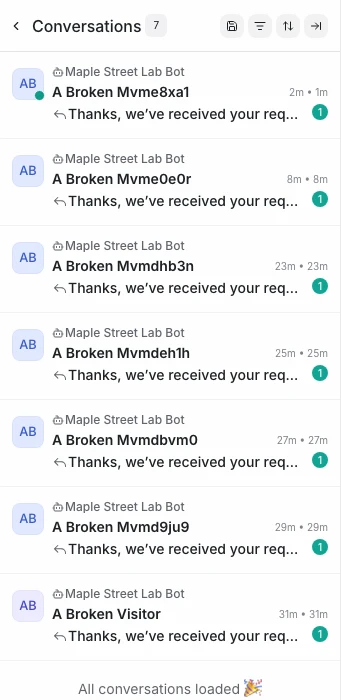
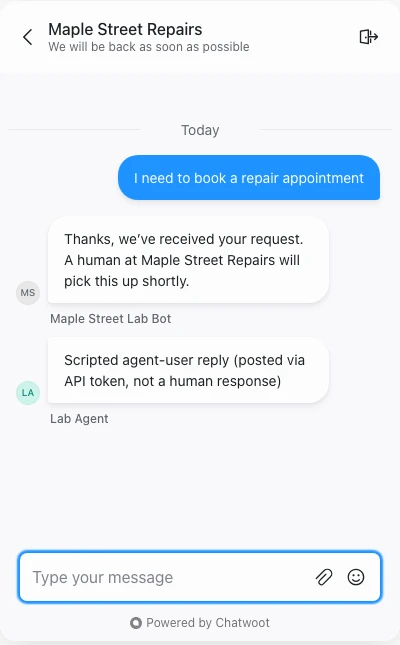
A false handoff, fixed
We reproduced a handoff where the visitor is told a person is coming but the conversation never reaches the agents' Open queue (a switch in our own bot skips the handoff after the acknowledgement), then fixed the bot so it verifies the handoff before reporting success.
Auto-resolve with no reply
We showed how one bot message after handoff can let auto-resolve close a conversation that no person answered, and how keeping the bot silent prevents it.
Emails that were never sent
We traced why expected conversation emails did not send, and why survey and auto-resolve messages arrive differently than the settings suggest, to Chatwoot's own source code.
Signed, deduplicated webhooks
The bot checks webhook signatures and ignores duplicate deliveries.
Each scenario was a single run, not a benchmark. Replies on the agent side were scripted, not written by people. Backups, restores and upgrades were not tested in the lab, and it is not a production system or a client deployment.
What we would do for you
Setup, configuration, integrations, and a second look when it misbehaves.
Setup
Chatwoot installed on one of the vendor's documented routes, on hosting you own; or an existing install taken as it is. TLS, email and background jobs configured, backups set up with one restore checked, and a written upgrade procedure.
Inbox and workflow configuration
One inbox and a channel you already hold an account for, agents and teams, an assignment rule and canned responses, then one full conversation verified: inbound, assigned, answered, resolved.
Integrations
Chatwoot's webhooks and API connected to a named system, such as your CRM or order tool, with signature checks, duplicate handling and a note on what happens when the other side is down.
Handoff and notification troubleshooting
A read-only look at an inbox that is losing conversations or emails, ending in causes ranked by consequence and a fix order. It follows the same approach as our integration diagnostic.
After the install
What you get, what you keep, and what happens next.
What you get
A working inbox on hosting you own, set up around how your team answers: agents, teams, an assignment rule, canned replies and one conversation followed from the visitor's first message to resolved. Plus a written upgrade procedure and a walkthrough for whoever will run it.
What you keep
The server, the conversations and the accounts, with a named owner on your side. We connect other systems through Chatwoot's webhooks and API instead of editing Chatwoot's own code, because Chatwoot's update tool assumes the code has not been modified and Chatwoot does not support custom changes to it.
What happens after
Someone has to apply updates and watch the backups. Chatwoot published eight releases between 27 July and 20 November 2026, so this is routine work, not a one-off. You can do it yourself with our procedure, or ask for bounded maintenance agreed separately.
Chatwoot's own backup guide says a backup has to cover four things: the database, uploaded files, the configuration settings, and any code customisations. That is the list a backup we set up for you is checked against.
Not shown yet: in our own lab we have not restored a backup or run an upgrade, so the backup and upgrade steps above describe what a launch includes, not a track record. Sources: Chatwoot's developer documentation (self-hosted backup and enterprise pages) and its GitHub releases list, read on 24 November 2026.
Editions and costs
Which features are free, and which are Chatwoot's to charge for.
Community Edition
Free and self-hosted. Chatwoot's code is MIT-licensed outside its enterprise directory, which carries its own licence.
Premium Support
A paid self-hosted plan from Chatwoot. It adds Captain AI, voice calls, custom branding, agent capacity, roles and permissions, and priority support.
Enterprise Edition
Adds SSO or SAML and SLA policies to everything in Premium Support. Chatwoot describes it as proprietary software built from the same repository.
The paid plans are bought from Chatwoot and priced per agent per month; see Chatwoot's self-hosted plans page for the current figures. Chatwoot's guide says that adding paid features to a Community install later means a migration to the Enterprise Edition, so we raise the edition question before the install, not after.
- Vendor plans, hosting, email and channel provider fees are yours, not ours
- Channels such as WhatsApp or social messaging need the provider's own approval, which we cannot promise
- We are not a Chatwoot partner, and Chatwoot's own support plans are separate from our work
- No round-the-clock operations or uptime guarantee
Plan contents read on chatwoot.com and Chatwoot's user guide on 24 November 2026; vendors change plans, so we recheck at the start of any project. Self-hosting the community edition avoids the cloud subscription but adds a server, updates and someone to look after them. Whether that is cheaper than Chatwoot's cloud depends on how many agents you have and who will run it.
Before you write
What to tell us about your inbox.
- Where it runs: Chatwoot's cloud or self-hosted, and the version if you know it.
- The channels your customers use to reach you.
- The one problem, in a sentence, for example "visitors are told someone is coming and nobody replies".
- The outcome you want, and who will run the inbox afterwards.
Please keep passwords, API keys and conversation exports with customer details out of the form. If we work together, access is a revocable user on your own install.
Questions
Common questions
Will you add AI to our inbox?
The lab bot deliberately uses no AI. If you want an assistant that answers customers, that is our AI agents and assistants service, built with human handoff. Chatwoot's own Captain AI is a paid-plan feature from Chatwoot.
Can you work on an install someone else set up?
Yes. Troubleshooting starts read-only, and nothing changes until you have the findings and agree the fix.
Is your inbox losing conversations somewhere?
Describe what the customer sees and what your team sees. Amit replies directly, and any work starts with a written scope.